
WhatsApp that brings customers back
Send offers, reminders, and post purchase messages in a channel customers use every day.
After leaving the store
The message follows up after the visit
Customers leave their phone number and permission while visiting the store. Later they receive a WhatsApp message, return to the offer with one click, or reply immediately.
Customers subscribe in the store
You can collect a phone number and permission through a form prepared in DropUI.
The message reminds them about the offer
After they leave the store, you send an approved message matched to the campaign.
A reply starts a conversation
When a customer replies, you see the message and continue the conversation directly in DropUI.
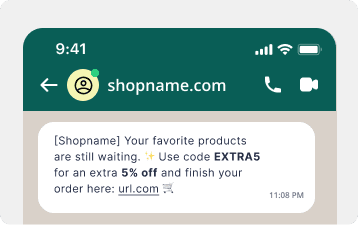
Campaigns and conversations
A campaign can become a conversation
The first message uses a Meta approved template. Fill it with recipient data, add media, and lead to a specific offer. If the customer replies, continue the conversation in the same dashboard.
- A template approved by Meta
- Recipient specific information
- An image, video, or PDF document
- Buttons and offer links
- All contacts or a selected audience
- Customer replies in one dashboard
Your setup
How to launch WhatsApp
Connect your business number, choose an approved template and audience, then send the message immediately or at a selected time.
Connect a WhatsApp number
Connect your Meta business account to DropUI. This number will appear as the sender of your messages.
Choose the template and audience
Use an approved template, complete its content, and select the contacts who should receive the campaign.
Send and handle replies
Launch the campaign now or schedule it. After sending, review deliveries and reads and reply to customers in DropUI.
FAQ
Common WhatsApp questions
Yes. Marketing campaigns can only be sent to contacts with recorded permission for communication in this channel.
Meta requires an approved template when a business starts contact outside an active conversation. DropUI shows templates available for the connected sender.
Yes. Their reply appears in the DropUI conversation dashboard, where you can continue the exchange.
Yes. Depending on the selected template, send an image, video, or PDF document and add buttons leading to the offer.
Yes. Send a campaign to all contacts with permission, a selected audience, or specific people. Deliver it immediately or schedule it.
DropUI shows the audience size, delivered and read messages, clicks, and delivery errors.
See how to use WhatsApp in practice
Explore ready scenarios for reminding customers about offers, recovering interest, and continuing contact after a visit.
Explore scenarios