
SMS for short and urgent messages
Share the most important information in a simple format that takes customers directly to your store.
After leaving the store
A short message leads directly to action
Customers leave their phone number and permission during a store visit. Later they receive a concise message with the key information and a link that takes them directly to the right place.
The feature will officially launch in October 2026.
Customers provide their phone number
Collect a number and permission through a DropUI form or add them when importing contacts.
The message arrives at the right moment
SMS can remind customers about an ending promotion, an abandoned cart, or an important deadline.
The link leads to a specific goal
One click takes the customer to a product, cart, category, or selected offer.
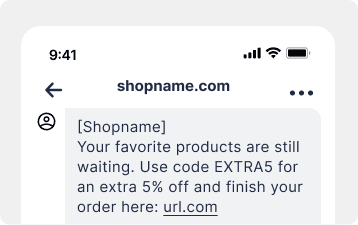
SMS campaigns
Campaigns created for a fast response
SMS works when a message should be concise, clear, and delivered at the right time. Send a standalone campaign or use the message as a step in an automated scenario.
- Standalone and automated campaigns
- A selected audience
- Personalized message content
- A link leading to the store
- Immediate or scheduled delivery
- Connection with other DropUI channels
Your setup
How to launch an SMS campaign
Choose the goal, write a concise message, and set the audience and delivery time. DropUI connects the message with the other campaign activities.
Choose the goal
Decide whether you want to remind customers about an offer, recover a cart, share a discount code, or communicate an important deadline.
Prepare the message
Write a concise message, add recipient data and a link to the place where the customer should take the next action.
Set the audience and delivery
Choose contacts with permission, send the campaign immediately or add SMS to a scenario, then review results in DropUI.
FAQ
Common SMS campaign questions
Yes. SMS will be a complete DropUI channel connected with contacts, campaigns, and automated scenarios.
Yes. Marketing messages can only be sent to people who gave permission for SMS communication. DropUI lets you save it together with a phone number.
Yes. A message can become the next step after a signup, abandoned cart, purchase, or another event used in a scenario.
Yes. The message can use recipient data and information related to the campaign.
Yes. Send the campaign to a selected contact group immediately or at a scheduled time.
DropUI will show key information about sending, message delivery, and clicks on the link included in the message.
See how to use SMS in practice
Explore ready scenarios for recovering carts, reminding customers about promotions, and sharing important information.
Explore scenarios