
Bars that support purchase decisions
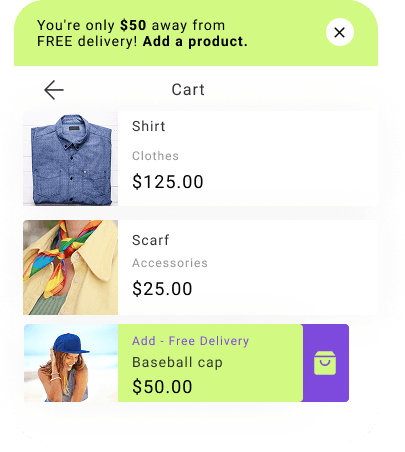
Show promotions, free shipping thresholds, and important deadlines without covering products or interrupting shopping.
Customer experience
Important information stays in view
A bar appears at the top or bottom of the store and communicates one clear message. It does not cover products, stays visible while people shop, and helps you make better use of existing traffic.
The message appears right away
Information about a promotion, delivery, or important deadline appears without opening another window.
The content can change while customers shop
The bar can show how much is left to qualify for free shipping or how long a promotion will last.
A button leads to the next step
One click leads to a product, category, or offer details.
Display rules
Show the right bar in the right place
You decide where the bar appears, who sees it, and how long it remains visible. Match the message to the current page, cart contents, device, traffic source, and visit history.
- A bar at the top or bottom of the screen
- A bar embedded in the page content
- A specific product or category
- Cart value and contents
- A new or returning customer
- A selected device, traffic source, or campaign time
Your setup
How to launch a bar
Choose the goal, prepare a short message, and decide where it should appear and who should see it. DropUI handles the rest.
Choose one goal
Decide whether the bar should announce a promotion, show the free shipping threshold, count down time, or lead to a product.
Prepare the content and design
Add a short message, button, or countdown and match the colors to your store. You can also use the AI assistant for support.
Set the placement and audience
Choose the bar position and display conditions, launch the campaign, and review its results in the DropUI dashboard.
FAQ
Common bar questions
It does not have to. The bar can automatically move page content or become part of the layout. You can also attach it to the top or bottom edge of the screen.
Yes. It can use the cart value and show in real time how much remains to qualify for free shipping.
Yes. A bar can include text, a button, countdown, and progress indicator. You can match its design to your store.
No. Once DropUI is connected, you can prepare the content, design, position, and display rules yourself in the dashboard.
Yes. You can adapt its design to smaller screens and decide which devices should display it.
No. You can prepare different messages based on the page, cart, traffic source, device, and customer visit history.
See how to use bars in practice
Explore ready scenarios for increasing cart value, promoting offers, and directing customers to products.
Explore scenarios