
Email connected to store behavior
Continue the conversation after a visit with messages based on what the customer actually did.
After leaving the store
The message continues what started in the store
Customers leave their email address and permission during a visit. Later they receive a message matched to what they did in the store and can return to the offer exactly where they stopped.
The feature will officially launch in September 2026.
Customers subscribe during the visit
Collect an email address and permission through a popup, bar, Embed, or Feed prepared in DropUI.
A scenario sends the right message
Email can remind people about an offer, welcome a new subscriber, or bring them back to unfinished shopping.
A click brings them back
A button in the message leads to a product, category, cart, or selected campaign.
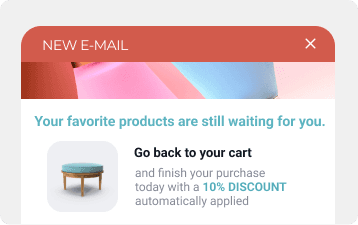
Email campaigns
Campaigns matched to the goal and audience
In DropUI, prepare both one time deliveries and messages that form part of an automated scenario. Content can use recipient data and previous actions in the store.
- One time and automated campaigns
- Audiences selected using data and behavior
- Personalized message content
- Offers and links leading to the store
- Immediate or scheduled delivery
- Layouts for mobile and desktop devices
Your setup
How to launch an email campaign
Choose the goal, prepare the message, and set the audience and delivery time. The campaign uses the same contacts and data as the other DropUI channels.
Choose the goal
Decide whether you want to welcome a new subscriber, promote an offer, recover a cart, or encourage another purchase.
Prepare the message
Build the content and layout in the editor or tell the AI assistant what you need. You can refine every element yourself.
Set the audience and delivery
Choose a contact group, send the message immediately or add it to a scenario, then review results in DropUI.
FAQ
Common email marketing questions
Yes. Email will be a complete DropUI channel connected with contacts, campaigns, and scenarios in one dashboard.
Yes. Marketing messages can only be sent to people who gave the appropriate permission. DropUI lets you collect it together with an email address.
Yes. A message can become the next step after a signup, page visit, abandoned cart, or another event used in a scenario.
Yes. Ask for an idea, content, and layout, then refine selected elements in the editor.
Yes. Send a campaign to contacts that meet selected conditions instead of delivering the same message to the entire database.
DropUI will show key information about deliveries, opens, clicks, and recipient actions after returning to the store.
See how to use email in practice
Explore ready scenarios for welcoming new subscribers, recovering carts, and encouraging another purchase.
Explore scenarios