
Web Push that brings customers back
Reach customers with a short message even after they have left your store.
After leaving the store
The message arrives after customers leave
Customers do not need to keep your store open. If they previously allowed notifications, they can see a short browser message, and one click brings them directly to a selected destination.
Customers give permission in the store
You can collect Web Push subscriptions through an onsite message, Feed, or a dedicated button.
The notification appears later
Send a short message when you want to remind people about an offer or encourage them to return.
A click brings them back
The notification opens a selected product, category, cart, or promotion page.
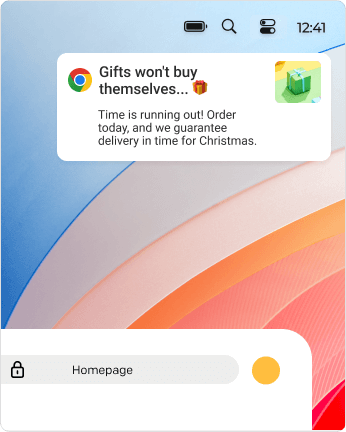
Notification content
A short message with a clear next step
Web Push is designed to capture attention quickly and make returning to the store easy. Add a title, short message, image, and link. You can also prepare buttons and different language versions.
- A title and short message
- An image, icon, and brand badge
- A link to a selected store page
- Up to two buttons
- Different language versions
- Automatic UTM tracking
Your setup
How to launch Web Push
First collect permissions, then prepare the message and choose when to send it. DropUI shows how many notifications arrived and how many people returned to the store.
Collect permissions
Ask store visitors to enable notifications. Only people who knowingly agree are added to your audience.
Prepare the message
Add a short title, message, image, and link leading to the place you want recipients to visit.
Send now or schedule it
Start the delivery immediately or choose a specific date. After sending, review deliveries, clicks, and CTR in DropUI.
FAQ
Common Web Push questions
No. After giving permission, a notification can appear even when the store page is not open.
No. Recipients subscribe directly in their browser, so they do not need to provide an email address or phone number.
No. The browser requires the user to knowingly allow notifications.
Yes, on supported devices and browsers. How a notification appears depends on the operating system and user settings.
Yes. Send a message immediately, select a specific date, or use the available delivery timing settings.
DropUI shows sent and delivered notifications, clicks, errors, and CTR.
See how to use Web Push in practice
Explore ready scenarios for recovering carts, reminding customers about offers, and bringing them back to the store.
Explore scenarios